Anyone who uses video on a computer, from editors to casual users, knows that sometimes different video formats can be incompatible with software. Luckily all the major video player applications that come with a computer (e.g. Windows Media Player, QuickTime Player) or are downloaded from the Internet (e.g. VLC, MPEG Streamclip and many others) can play almost any video we throw at them. But if you want to know more about formats and their peculiarities, read on.
Showing posts with label software. Show all posts
28 March 2013
Video file containers
Anyone who uses video on a computer, from editors to casual users, knows that sometimes different video formats can be incompatible with software. Luckily all the major video player applications that come with a computer (e.g. Windows Media Player, QuickTime Player) or are downloaded from the Internet (e.g. VLC, MPEG Streamclip and many others) can play almost any video we throw at them. But if you want to know more about formats and their peculiarities, read on.
28 August 2012
Discs, media and encoding
The key to it all is understanding the difference between what is disc media, and what is encoding ("encoding" is often informally referred to as the format of the disc).
20 August 2012
After Effects CS3 performance comparison
A while back I had an After Effects project with 640 layers of footage. I've had to learn patience with my ancient Power Mac which struggles to render anything in real time, even simple comps, but I shouldn't have been surprised to find that 640 layers took about 40 seconds per frame. The entire 90-second animation took 23 hours.
17 May 2012
After Effects CS3 crashing on save
I recently found a bargain-priced copy of Adobe After Effects CS3 on eBay. It's the full professional version for my Mac so I didn't foresee any problems. I'd been using it for a few weeks before I ran into what seemed like a terminal issue...
20 February 2012
A fix for Final Cut Studio crashes
One of the Macs in our office has just been updated to Snow Leopard (yeah, we're a bit behind the rest of the world) and we found that Motion 4 and Compressor 3.5, the versions in Final Cut Studio 2, were crashing. Compressor would hang or crash if you tried to change the output location from the default 'Source', and Motion was particularly frustrating because you couldn't even save a project, or export from an unsaved project, without it crashing and losing all your work.
After a bit of searching I eventually found a fix. It was tricky to find because it's not an issue specific to Motion or Compressor, but across all of Apple's Pro applications after Mac OS has been updated to 10.6 Snow Leopard. The fix is here:
https://discussions.apple.com/thread/3155576?start=0&tstart=0
It requires a bit of typing in Terminal which can be a bit scary due to using the superuser commands. Copy and paste the lines in the instructions if you're not a confident typist!
After a bit of searching I eventually found a fix. It was tricky to find because it's not an issue specific to Motion or Compressor, but across all of Apple's Pro applications after Mac OS has been updated to 10.6 Snow Leopard. The fix is here:
https://discussions.apple.com/thread/3155576?start=0&tstart=0
It requires a bit of typing in Terminal which can be a bit scary due to using the superuser commands. Copy and paste the lines in the instructions if you're not a confident typist!
10 January 2012
Retrieving pictures from multiple folders
![]() |
| That there is 214 folders. You, Canon 350D sir, are an arse. |
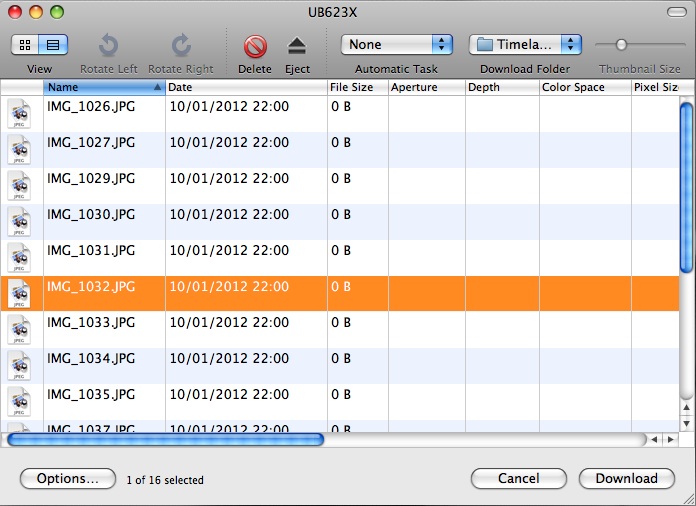
If you take a lot of photos (say, a couple of thousand while time-lapse shooting) one of those chief face-palm moments is when you pop the memory card into your computer, and find the camera has sorted your tidy sequence of photos into lots of folders. Hundreds of folders. Going back and forth copying a folder of images at a time is not my idea of being productive. Lucky, then, there's a standard application in Mac OS X that can do this for you.
Image Capture (found in the Applications folder, naturally) can be used to copy content from a memory card or a camera. It doesn't browse the folder structure like the Finder, instead it lists all the media files together (photos, video etc.), allowing you to select the batch you want and instruct it to copy to a destination of your choosing. No back-and-forthing required.
(Incidentally, iPhoto also does this in a roundabout way, but I find iPhoto to be a bit slow when loading up my entire photo library, which it insists on doing upon launching, whereas Image Capture is a relatively lightweight app and just gets on with it.)
Simply open Image Capture, tell it to Download Some, switch to list view, and tell it where to copy your images by way of the Download Folder setting. Voila, all your images in one folder by way of a few mouse clicks rather than millions and gabillions.
17 October 2011
New film: The Wheels
"Sometimes you don't realise you're working too much..."
A short film created specially for the fixed theme of "The wheels went round" for the Chairman's Challenge at Huddersfield Film Makers Club, October 2011.
Although the upcoming Chairman's Challenge had been known of for some months, it didn't feel like a proper challenge if we couldn't cram all the work into the final 10 days before the show. It was at this point that I, and my semi-reluctant star Dave, realised we had just one weekend left.
I cobbled together the basic premise of the story and drew up a storyboard, only the second time I had bothered to do so. I thought it would be useful to tick off shots once they were in the can* but it was also very handy to ensure shots followed-on from one another and didn't look too disjointed. And of course I looked very professional, so much so that I left the beret at home.
We shot during Saturday and Sunday and I spent the next four evenings beavering away at the computer. There was a lot of time consuming post-production effort for a modest project like this one but the deadline really helped to spur me on. By this time Dave's work was done and he was relaxing in his trailer.**
Shot on a Canon 600D digital SLR with Rode VideoMic. Raw footage was transcoded to Apple Intermediate Codec using MPEG Streamclip. Edited in Final Cut Pro, transferred to After Effects using BasicFCPtoAE, where graphics were composited and shots were colour graded.
* I keep all my camera memory cards in a biscuit tin.
** Dave lives in a trailer. The house in the film has been empty for months so we helped ourselves. We call it 'being resourceful.'
10 October 2011
Transferring projects from Final Cut to After Effects
I'm a big fan of using Final Cut Pro for speedy editing and sound mixdown, then switching my project to Adobe After Effects for colour grading, graphics and titles.
The hard way
This workflow can be a pain. FCP can't migrate projects to AE seamlessly like Adobe Premiere, and since I've doggedly refused to adopt Premiere, I've been forced to manually re-create my edit in AE, either by exporting my FCP sequence in Uncompressed 10-bit* (for MiniDV projects), or importing the native clips into AE and setting in/out points (for file-based clips, e.g. from solid-state media). The first is restrictive and hogs hard drive space, the second can be enormously time consuming even for a short sequence.
*At home I have FCP 5, so no ProRes codecs.
The easy way
The alternative was a very good utility called Automatic Duck, which looks like it has recently been assimilated into Adobe. It transfers to and from FCP, AE along with Avid and other software too,but was a bit pricey at several hundred dollars/pounds. Edit: Automatic Duck software has recently been made free. As in beer. Download your copy now before they change their mind!
The easy & cheap way
Recently I found an excellent After Effects script from Popcorn Island called FCP2AE, and it does a good job converting FCP's XML export file into After Effects CS3, CS4 and CS5. I have tried a legacy version on AE CS3 and it worked well. Unfortunately I can only use After Effects 7 at home, for which this script is not compatible.
The easy & cheap way if you're stuck in the Dark Ages
Shortly thereafter I made an even more fabulous discovery -- a similar solution which is compatible with older software all the way back to After Effects 6.5 and Final Cut Pro 4. BasicFCPtoAE is an application that converts FCP's XML file into an After Effects script, which can then be run in AE and imports the edited sequence and all the native footage. It uses an earlier version of FCP's XML, so it cannot transfer transitions and effects, but if all you want is to get your straight cuts into AE without re-editing the whole sequence again, it is proper bone-fide awesome.
In fact if you're just after no-nonsense cuts, BasicFCPtoAE is actually better than the more modern FCP2AE. For the latter, the imported sequences and clips are structured in a hierarchy of folders, whereas for BasicFCPtoAE your After Effects project shows the sequence and the clips, that's all. Much simpler to navigate.
The hard way
This workflow can be a pain. FCP can't migrate projects to AE seamlessly like Adobe Premiere, and since I've doggedly refused to adopt Premiere, I've been forced to manually re-create my edit in AE, either by exporting my FCP sequence in Uncompressed 10-bit* (for MiniDV projects), or importing the native clips into AE and setting in/out points (for file-based clips, e.g. from solid-state media). The first is restrictive and hogs hard drive space, the second can be enormously time consuming even for a short sequence.
*At home I have FCP 5, so no ProRes codecs.
The easy way
The alternative was a very good utility called Automatic Duck, which looks like it has recently been assimilated into Adobe. It transfers to and from FCP, AE along with Avid and other software too,
The easy & cheap way
Recently I found an excellent After Effects script from Popcorn Island called FCP2AE, and it does a good job converting FCP's XML export file into After Effects CS3, CS4 and CS5. I have tried a legacy version on AE CS3 and it worked well. Unfortunately I can only use After Effects 7 at home, for which this script is not compatible.
The easy & cheap way if you're stuck in the Dark Ages
Shortly thereafter I made an even more fabulous discovery -- a similar solution which is compatible with older software all the way back to After Effects 6.5 and Final Cut Pro 4. BasicFCPtoAE is an application that converts FCP's XML file into an After Effects script, which can then be run in AE and imports the edited sequence and all the native footage. It uses an earlier version of FCP's XML, so it cannot transfer transitions and effects, but if all you want is to get your straight cuts into AE without re-editing the whole sequence again, it is proper bone-fide awesome.
In fact if you're just after no-nonsense cuts, BasicFCPtoAE is actually better than the more modern FCP2AE. For the latter, the imported sequences and clips are structured in a hierarchy of folders, whereas for BasicFCPtoAE your After Effects project shows the sequence and the clips, that's all. Much simpler to navigate.
Subscribe to:
Posts (Atom)